Posts

Aplikasi Sistem Rekording dan Analisis Genetik Ternak

Aplikasi ini dirancang untuk membantu peternak dalam melakukan pencatatan data silsilah (pedigree) dan menghitung koefisien inbreeding (silang dalam) pada populasi ternak secara otomatis dan akurat. Peternak bisa merencanakan untuk menghindari terjadinya keturunan yang inbred melalui menu Cek Perkawinan. Silakan masukkan data silsilah ternak Anda pada format yang tersedia di bawah ini untuk memulai analisis genetik:

All windows opened maximized on Ubuntu

After I installed Unity, since then all windows I opened was always maximized. You don't like this ha? This solution worked for me. I can't guarantee it will for you, though it's worth trying. The solution is by removing 'maximus'. You can remove it from Synaptic or whatever way you are comfortable with. If you want to do it from the terminal, issue this command: sudo apt-get remove --purge maximus Good luck!

Marhaban yaa Ramadan

Beberapa hari lagi bulan suci Ramadan insya Allah datang menghampiri kita. Semoga Allah memanjangkan umur kita sehingga kita bisa menyambut dan menjumpai Ramadan. Semoga kita semua diberi kekuatan, dikokohkan iman dan Islam kita sehingga dengan ringan hati kita akan mengisi Ramadan tahun ini dengan yang lebih baik dibanding Ramadan tahun lalu. Semoga Allah menurunkan rahmat dan kasih sayang Nya untuk kita semua, makhluk semesta alam, amin.

Storing notes of TOMBOY on different location

This guide is intended for Ubuntu users (it may work on other Linux distro though). If you are running TOMBOY 0.15.6 or later, all your TOMBOY notes are stored on ~/.local/share/tomboy/. You can change its default directory for your notes. This especially makes sense if you dual boot Ubuntu for example with Windows so you only want the same notes accessible from both OSs. Open terminal then run these commands: 1. sudo cp /etc/profile /etc/profile.bak (make backup of /etc/profile into /etc/profile.bak) 2. sudo gedit /etc/profile (edit /etc/profile) 3. copy and paste this line (without quotes): "export TOMBOY_PATH=/media/STORAGE/Tomboy_notes". This will set up " /media/STORAGE/Tomboy_notes" for your Tomboy PATH . Change " /media/STORAGE/Tomboy_notes" accordingly to what directory you want to store your notes. 4. Restart the system and now Tomboy will read notes stored in that directory. Good luck.

Add Reminder Add-in on Ubuntu 10.04 (Lucid Lynx)

Earlier I showed steps to add Reminder add-in on earlier version of Ubuntu ( http://gusantov.blogspot.com/2008/07/event-reminder.html ). This note is about how to add Reminder add-in on Ubuntu 10.04 (Lucid Lynx). I wrote this because there's slightly different in the way the add-in files of Tomboy are stored. In earlier versions of Ubuntu (correct me if I'm wrong), add-in files are stored in ~/tomboy/addins . In Ubuntu 10.04 these files are stored in /usr/lib/tomboy/addins . So, if you want to add Reminder add-in, after you download the dll file (I choose the binary one) ( http://flukkost.nu/blog/tomboy-reminder/) , then move it to /usr/lib/tomboy/addins . You need to enable it (see my previous note) afterward. If you can't see Reminder add-in in there, you need to restart your system (this is what I did to make it appear on the add-ins list). Good luck.

Transparent Dropdown Menu

Image
This tutorial is answer question "how to make my dropdown menu transparent?". Here is how to it. 1. Open CCSM (CompizConfig Setting Manager) then enable Opacity, Brightness and Saturation (see picture). 2. If you have nothing underneath, then specify what type of window you want (e.g. dropdownmenu). Add the type of window by clicking NEW (see picture). 3. Adjust the level of transparency you like by cha nging the the "Window values", the value of 90 is pretty good. For more information, follow this link http://wiki.compiz-fusion.org/WindowMatching That's it.

You messed up your Compiz

Ok, you like Compiz desktop effect with its cool features such as 3D desktop, wobbly effect, etc. Then you play around to explore more features you want to apply. Suddenly your desktop messed up, such as your mouse behave strange, you can't click the menu for instance. Don't get nervous, relax. You tried uninstall Compiz and clean install it but still no luck. Take deep breath. This tip is a special guide if you experience the same problem with me. After clicking here and there setting up your Compiz, then your mouse seem behaves abnormal, it won't click the menu. It happened to me after I enable "window move" feature by setting a particular key binding (I didn't remember what keys I selected). After trying removing then reinstalling the Compiz, I came up an idea to click the menu with combination between "shift" button and mouse click. It worked. So then I setup my Compiz again and click on "window move", I set the key binding to its defau...

Ubuntu 9.04

What I usually did when a new version of Ubuntu has been released was testing it with the live CD. I want to have an impression before i decide whether or not I will upgrade my system. The same thing I did when Ubuntu 9.04 (code name Jaunty Jackalope) has been released a few days ago. I have been really amazed with the capability that Ubuntu 9.04 has now offer. I tested the live CD on my Sony Vaio VGN-NR120E. From the past versions, I usually have problem with the wireless connection. With this new version, everything is flawless, including the wireless connection, it was working just by inserting the live CD, without installing anything. It detect all available wireless networks including my home network. I really want to upgrade my system to this new version of Ubuntu. Unfortunately I have to wait a little bit longer. Now I'm in the middle of something which is urgent to do,finishing my study. Once this is done, I promise, I will upgrade my Ubuntu 8.10 version with the newest ...

Install Offline English Dictionary

Image
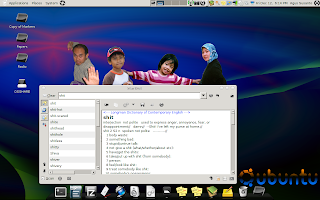
If you're looking for a free English dictionary to install onto your computer. But why do we need to install an offline-dictionary software if it's available online? Simple, if internet connection is not cheap to pay, then this is the solution. I recommend Stardict. It's a free-opensourced software with a lot of dictionary to choose. "StarDict is a Cross-Platform and international dictionary Software. It has powerful features such as "Glob-style pattern matching", "Scan selection word," "Fuzzy query," etc. Stardict Version3.0 has developed a lot of new functions, such as Full-text translation, Net Dict. Thousands of free dictionaries can be found on the internet. Choose your own favorites". ( http://stardict.sourceforge.net/index.php ) Below is the steps to install it on Ubuntu (for other Operating Systems, do similarly): 1. Search and install Stardict (including the depencies) in your Snaptic Package Manager. 2. Download any ...

Suspend problem fixed on Ubuntu

On my previous post regarding wireless problem on my Sony Vaio VGN-NR120E, the problem was fixed using madwifi-ng-r2756+ar5007.tar.gz driver version. Though, the driver conflicts with suspend ability so since then my laptop lost its ability to suspend. Both of my wireless and suspend problem have been fixed after following this link http://ubuntuforums.org/showthread.php?t=792158. (Thanks to bmartin who provides the detail guide). Below is the steps: 1. If you installed another driver, please uninstall (make uninstall) it and clean (make clean) it. 2. Copy and paste these commands onto your terminal sudo aptitude update && sudo aptitude -y install build-essential linux-headers-$(uname -r) cd ~ wget -O driver.tar.gz http://snapshots.madwifi.org/madwifi-hal-0.10.5.6-current.tar.gz tar xf driver.tar.gz cd madwifi-* make sudo make install echo ath_pci | sudo tee -a /etc/modules sudo modprobe ath_pci 3. Restart you system 4. After that, you'll see your wireless connecti...

Tarawih bersama

Assalamu'alaikum brothers and sisters, Iftar dan Tarawih bersama pada tahun 1429H ini insya Allah akan diadakan di Community Centre (Wellington Woods #140). Ruangan sudah di booked mulai jam 19:30 hingga 23:00. Jamaah diharapkan menyiapkan alas sholat dan potluck untuk Iftar. Jadual sholat bisa lihat di sini dan tanggal/hari untuk Tarawih adalah sebagai berikut: 1. 31 Agustus 2008 2. 12 September 2008 3. 19 September 2008 4. 26 September 2008 5. 27 September 2008 Sedianya saya mau book ruangan untuk setiap malam Sabtu dan malam Minggu di tempat yang sama. Tapi karena tempat sudah di booked oleh pihak lain maka hanya pada tanggal-tanggal tersebut di atas Community Centre bisa kita gunakan. Semoga Allah menguatkan iman, Islam dan kesehatan kita semua sehingga kita bisa menjumpai Ramadhan tahun ini dan mengisinya dengan amal sholeh yang lebih baik dari tahun-tahun lalu. Semoga Allah menerima amal kita semua, amin.

Firefox won't load - easy solution

There are now many ads-on or extension offered for your Firefox web browser. After you installed one or two, suddenly your Firefox won't run normally, it keeps transferring data and never ends. Don't be scared, you'll be alright, I had this problem before and here is the solution. In my case, my Firefox misbehave after I installed ReminderFox. It's a handy event reminder but eventually I have to uninstalled it. So here is the solution of the problem (I assume you use Ubuntu, similar procedure probably can be done too for other OS or Linux distro): 1. Run Firefox in safe mode, type in your terminal firefox -safe-mode 2. You'll be prompted with several option to what state you will put your Firefox to, in my case, I disable the extension. 3. Then press OK. That's it.

Event Reminder

Image
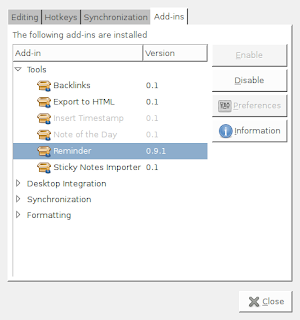
If you ever need simple though handy event reminder on your computer, you may try ReminderFox. It's an add-ons for Firefox browser that's compatible with Firefox 1.0 to 3.0. You can install it from your Firefox by clicking Tools>Add-ons then find ReminderFox. It's easy to set your events. After install, by default it's going to appear on the status bar of yout Firefox (right buttom). By right clicking your mouse you will find some options. Good luck. If you like Tomboy, you can add an addin to it to work as a reminder. Do these steps: 1. Download the addin from here http://flukkost.nu/blog/tomboy-reminder/ . It's easiest to work with the binary. 2. Move the binary to ~/.tomboy/addins 3. Enable the addin. Open Tomboy, click Edit>Preferences>Add-ins>Tools>Reminder>Enable. Please see the screenshot. For Window Vista users, after you install Tomboy and download the addin (go to here http://flukkost.nu/blog/tomboy-reminder/ ), then you need t...

CD Burner Software for Linux

Which one is the best CD burner software for Linux or Ubuntu specifically? There are many softwares for doing the task if you search through Synaptic in Ubuntu such as Bresero, Gnomebaker, cdrdao, etc. But so far, the best program (according to my experience) is K3B which is developed for KDE desktop environment but also works on Gnome. It is easy to use because it is working under GUI. Though, I had few bad experiences when burning data to DVD using K3B. A few times I failed to use the program.

HowTo Uninstall Unwanted Program in Ubuntu

OK, so you want to uninstall unwanted program(s) in Ubuntu? After you try it from GUI ways (Application>Add/remove or System>Administration>Synaptic Package Manager) you failed (the program is not listed there). Then you need to do it from command line (Terminal) at last: sudo apt-get remove pdfcrack (uninstall program called pdfcrack) or sudo apt-get --purge remove motion (uninstall program called motion including the configuration files) Happy uninstalling!

HowTo Fix Resolution Problem in Ubuntu

My widescreen has gone after updating kernel 2.6.24-19-generic. I don't know why. After trying to fix it by following some links, finally I made it back to the original screen resolution 1280x800. My Sony Vaio VGN-NR120E comes with Intel Graphics. If you have similar problem, you can try this (it worked for me but not guarantee will solve your problem). 1. Open Up Your Terminal 2. Run this command: sudo apt-get install xserver-xorg-video-intel 3. REBOOT your system 4. Edit the screen resolution: System>Preferences>Screen Resolution In my case, after choosing the correct resolution, the screen still behave wierd. Then I reboot the second time. Tha dha, it's solved. (The steps were taken from here : http://ubuntuforums.org/showthread.php?t=455741 )

Undefined Video Mode Number

If you happen to have "Undefined Video Mode Number" error message when you login into your Ubuntu, here is the solution! 1. Open your menu.lst file sudo gedit /boot/grub/menu.lst 2. Change statement that says vga=xxx (xxx is some numbers) with vga=normal 3. Reboot and tha dha.

HowTo install .deb package in Ubuntu

1. Download the file.deb 2. Go to the directory where you save the file.deb 3. Type the following command in your terminal sudo dpkg -i file.deb If you don't like typing, open your File Browser then double click on the file. Follow the instruction. Ubuntu is getting smarter, it makes you easy.

HowTo create permanent aliases in Ubuntu

When you frequently need to type the same long command on your terminal, you need to create aliases so you can save time. To create permanent aliases, follow this command: 1. Open your ~/.bash_aliases file with text editor you like then add the alias you want. (If you don't have .bash_aliases, create a new one on your home directory). Example: alias any_name='ssh user_id@any_address.ca' 2. Uncomment these 3 lines on your ~/.bashrc file if [ -f ~/.bash_aliases ]; then . ~/.bash_aliases fi 3. Restart your terminal, if it doesn't take effect you need to reboot system. I only need to restart the terminal to make the aliases take effect (I'm running 8.04).

Configuring your Emacs

You may edit .emacs file in your home directory (/home/your_login_ID/.emacs) to satisfy your liking. Some useful lines to add: 1. (transient-mark-mode t) It will enable syntax highlighting when you select text(s). 2. (setq inhibit-splash-screen t) It will ommit the emacs welcoming screen.